



WTMOD Zero
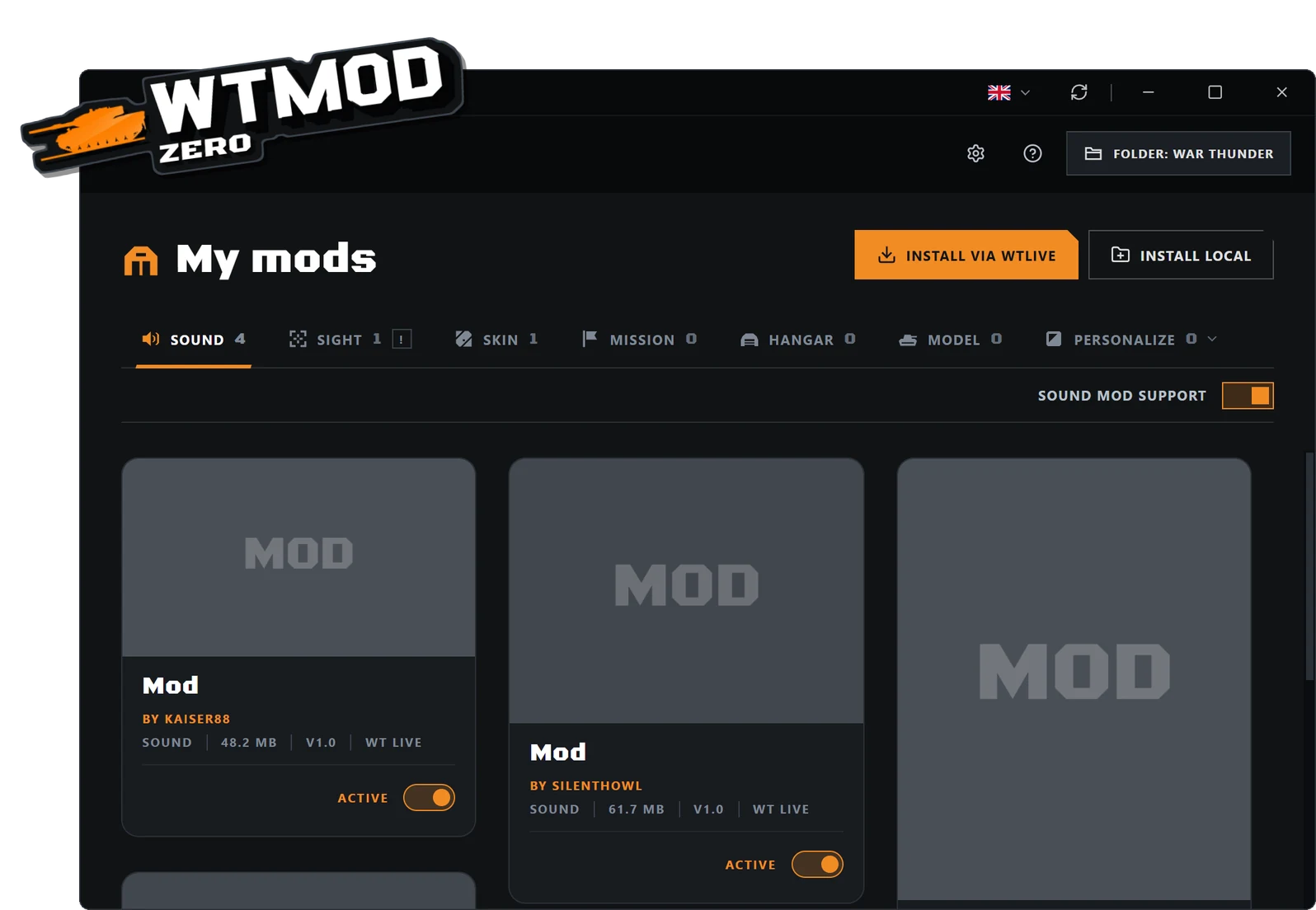
Installs the mods you get from WT Live, puts every file where the game expects it and turns each one on or off in one click.
- Sound, sight, skin, mission, hangar and model
- Install button on WT Live, with WTMOD Lite
- Personalize the game texts and the launcher background
What WTMOD Zero does
WTMOD Zero is a free War Thunder mod manager for Windows. Pick a mod on WT Live, and Zero works out what kind of mod it is, puts every file in the folder the game uses and leaves the mod ready to turn on or off whenever you like.
No copying folders by hand, hunting for the right folder in Documents or editing config.blk: Zero does it for you and keeps all your mods in one place.
Outdated sound mods working again
A sound mod made for an older version of War Thunder usually stops working after Gaijin's updates. When you turn one on, Zero rewrites it for today's game, whether it is from 2021 or broke with the latest update: what the mod lacks is filled in with the game's current sounds, and what it changed stays as close as possible to how it sounded back then. That includes old crew voice packs.
Several sound mods also work together. Most sound mods bring their own masterbank, and normally one mod's masterbank wipes out another's mixer. Zero puts each mod's mixer changes together on top of the game's current masterbank, so a weapons mod and a voice mod each keep what they change. Where two mods change the same thing, the newer one wins.
All of this happens on its own when you turn the mod on: a few seconds for most mods, a minute or two for a big old pack. After every game update, Zero makes the sounds of the mods that are on again. In Choose banks you pick which of the mod's banks go into the game and, for older mods, whether to keep the mod's own mixer or today's. The mod's files are never changed: turn it off and the game is back to how it was.
Mods it installs
- Sound mods: they go to the game's sound/mod folder, and Zero turns sound mods on in config.blk.
- Skins: they go to the game's UserSkins folder.
- Sights: they go to your account's UserSights folder, in Documents.
- Missions: they go to the UserMissions folder, with their texts.
- Hangars and models: they go to the game's content folder, and Zero points the game to the hangar you turned on.
- Localizations, which change the game's texts: they go to the game's lang folder, and Zero turns on reading those texts in config.blk.
How to install a War Thunder mod with Zero
Download Zero here, install it and open it. It looks for your War Thunder folder by itself.
On WT Live, copy the link of the mod's post and paste it into Zero. With the WTMOD Lite browser extension it gets even easier: every WT Live post gets an Install button, and one click is all Zero needs to download and install the mod.
The mod shows up in your mod list, ready to use. To take it out of the game, turn it off; to delete it for good, remove it. Zero takes out the files it put in.
Mods that update themselves
When a creator publishes a mod on WTMOD with automatic update turned on, every new version reaches the players who installed it with Zero by itself, with its name, description and cover. If you changed the mod's files, nothing is replaced. It is in an open test for everyone.
More than installing mods
Zero also changes the game's texts and the War Thunder launcher background, and builds a test mission so you can try a tank or a plane with your mods.
Frequently asked questions
Is WTMOD Zero free?
Yes. Zero is free, and new versions arrive through the app itself.
Does it work with WT Live mods?
Yes, it was made for them: it installs sound mods, skins, sights, missions, localizations, hangars and models, and tells each kind apart by what is in the file.
Are War Thunder mods allowed?
War Thunder has its own folders and options for player-made mods, such as UserSkins, UserSights and the sound mod folder. Zero puts the files in those places and does not change the game's program.
How do I uninstall a mod?
In Zero, turn the mod off to take it out of the game without deleting it, or remove it to delete it for good. The files Zero put in go with it.
My sound mod stopped working after a game update. What now?
Turn it on with Zero: it rewrites outdated sound mods for today's game, fills in what they lack with the current sounds and, after every game update, makes the sounds of the mods that are on again. Creators who want to move their FMOD project to Gaijin's new version can use WTMOD Migrator Engine.
Can I use more than one sound mod at a time?
Yes. Zero puts each mod's mixer together on top of the game's current masterbank, so one mod no longer wipes out another. Where two mods change the same thing, the newer one wins.
Which computers does it run on?
Windows 10 and Windows 11, 64-bit.
What is the difference between Zero and WTMOD Manager?
Manager will be the full app, with everything Zero and Migrator do plus a catalogue of community mods, and it is not available yet. Zero is the light app, made for WT Live mods.